Square Up Payment Gateway Module - Secure Payments & Currency Conversion
Accept secure Square payments in WHMCS with hosted checkout, automatic currency conversion, webhook reconciliation, refunds, and Sandbox support.
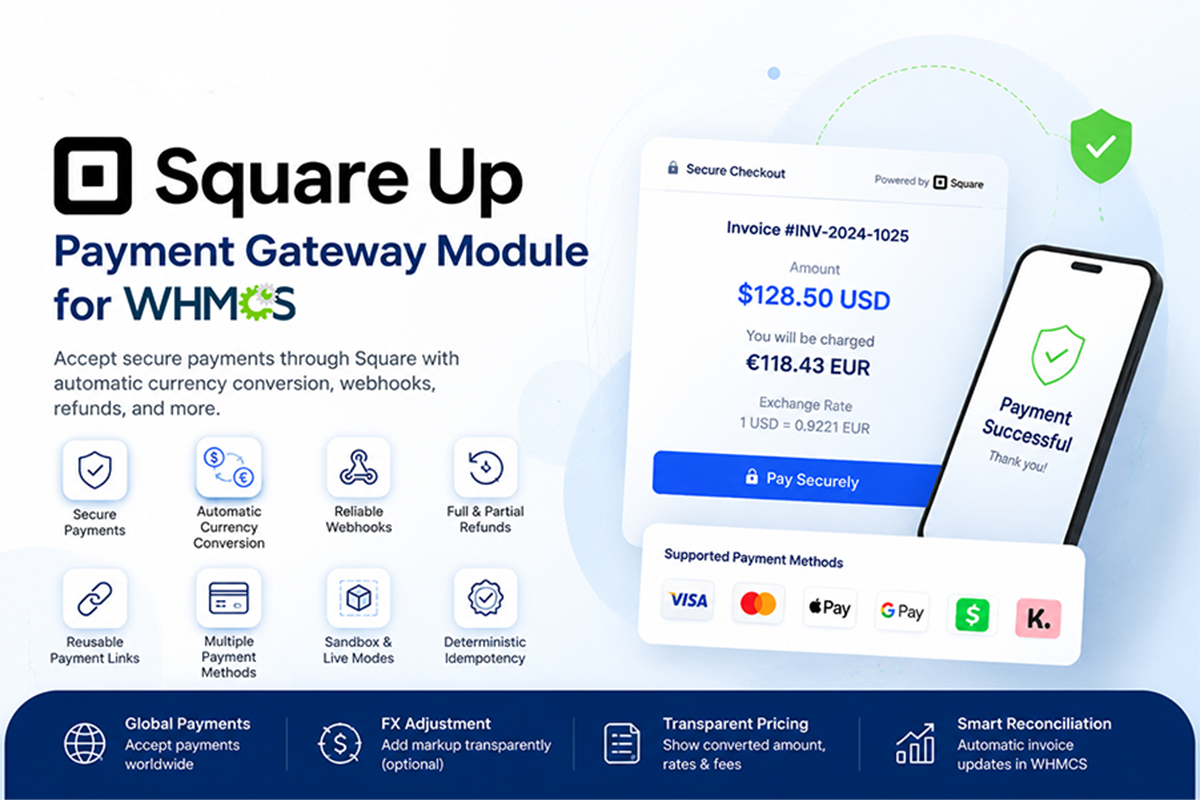
About Square Up Payment Gateway Module - Secure Payments & Currency Conversion
The module creates a Square-hosted payment page for each eligible invoice and can make supported payment options available according to the merchant’s Square account, country, currency, browser, and customer device. Depending on Square eligibility, payment methods may include cards, Apple Pay, Google Pay, Cash App Pay, and Afterpay/Clearpay.
If your WHMCS invoice currency differs from the currency configured for your Square location, the gateway can automatically convert the amount before payment. Customers are shown the original invoice total, converted charge amount, applied exchange rate, and any configured FX adjustment. Conversion quotes are protected by a signed, time-limited token to help prevent amount manipulation.
Secure webhooks reconcile completed Square transactions with WHMCS, validate payment details, prevent duplicate processing, and automatically mark the correct invoice as paid. The module also supports full and partial refunds from WHMCS, reusable hosted payment links, deterministic idempotency, Sandbox testing, and production processing.
Square-Hosted Checkout
Redirect customers to a secure Square-hosted payment page to complete their invoice payment.
Benefits include:
- Secure payment processing through Square
- No card information stored by your WHMCS installation
- Mobile-friendly checkout
- Automatic return to the WHMCS invoice
- Hosted payment-link reuse for pending invoices
Multiple Payment Methods
Depending on merchant eligibility and Square availability, hosted checkout can support:
- Credit and debit cards
- Apple Pay
- Google Pay
- Cash App Pay
- Afterpay/Clearpay
Administrators can individually enable or disable supported payment methods.
Availability depends on the Square seller account, country, currency, customer browser, device, and Square’s eligibility requirements.
Automatic Currency Conversion
Allow customers to pay invoices even when the WHMCS invoice currency differs from the Square location currency.
The module can:
- Detect the Square location currency automatically
- Convert the WHMCS invoice amount
- Round the charge to the currency’s correct minor units
- Display the original invoice amount
- Display the converted Square charge
- Show the applied exchange rate
- Add an optional FX adjustment
- Cache conversion rates for improved performance
- Protect the quote with a signed 15-minute token
Two Exchange-Rate Providers
Choose between two supported currency-rate providers:
Frankfurter
- Free to use
- No API key required
- Uses central-bank reference rates
- Suitable for businesses that do not require tick-by-tick rates
ExchangeRate-API
- Uses a free API key
- Provides the latest available exchange rates
- Suitable for businesses requiring more frequently updated rate information
Configurable FX Adjustment
Apply an optional percentage adjustment to converted payments.
- Set the adjustment to
0%for no gateway markup - Display adjusted converted totals transparently
- Inform customers that their bank or card issuer may impose separate international or conversion charges
Secure Payment Verification
Before recording a payment, the module validates important transaction information, including:
- WHMCS invoice ID
- Invoice ownership
- Invoice status
- Current invoice balance
- Square location
- Payment currency
- Converted charge amount
- Square transaction ID
- Duplicate transaction status
Only valid payments are added to the relevant WHMCS invoice.
Automatic WHMCS Invoice Updates
After Square confirms a successful payment, the module:
- Finds the related WHMCS transaction.
- Validates its amount, currency, and location.
- Checks for duplicate transaction IDs.
- Records the Square payment ID.
- Adds the payment to WHMCS.
- Marks the associated invoice as paid.
Secure Webhook Processing
Square webhooks provide reliable payment reconciliation.
The gateway includes:
- HMAC-SHA256 signature verification
- Exact webhook URL validation
- Payment-created event handling
- Payment-updated event handling
- Event ID de-duplication
- Transaction ID de-duplication
- Payment amount and currency verification
- Location ID verification
- Safe retry handling
Deterministic Idempotency
The module generates deterministic idempotency keys for hosted payments, embedded transaction processing, and refunds.
This helps prevent:
- Duplicate payment links
- Repeated charges
- Duplicate refund requests
- Multiple transaction records from customer retries
Reusable Hosted Payment Links
When a matching pending payment link already exists for the same invoice, amount, and currency, the module can reuse it instead of creating unnecessary duplicate Square checkout links.
Full and Partial Refunds
Process refunds through the standard WHMCS gateway refund function.
Supported capabilities include:
- Full refunds
- Partial refunds
- Square refund transaction IDs
- Converted-currency refund calculations
- Idempotent refund requests
- Refund status reporting to WHMCS
When the original payment was converted, the refund amount is calculated using the stored transaction exchange rate.
Sandbox and Production Modes
Test the gateway safely before accepting real payments.
- Square Sandbox environment
- Live production environment
- Separate Square credentials for testing
- Optional real-time diagnostic errors during setup
- Easy transition from testing to production
Customer-Facing Currency Disclosure
When currency conversion is required, customers can see:
- Original WHMCS invoice amount
- Currency in which Square will charge them
- Converted payment amount
- Exchange rate used
- Whether an FX adjustment was included
- Notice regarding possible card-issuer charges
This improves transparency and helps reduce confusion during international payments.
Optional Checkout Settings
Administrators can configure:
- Accepted payment methods
- Hosted tipping
- Shipping-address collection
- Merchant support email
- Checkout accent color
- Currency conversion
- Exchange-rate provider
- Exchange-rate cache duration
- FX adjustment percentage
- Sandbox mode
- Temporary diagnostic messages
Automatic Database Setup
The required database tables are created automatically:
mod_squareup_transactionsmod_squareup_events
These tables store transaction mappings, payment links, conversion data, payment status, idempotency keys, and processed webhook events.
Error Handling and Gateway Logging
The gateway records errors through the WHMCS gateway log while showing customers a controlled payment error.
A temporary diagnostic option can display detailed Square or exchange-rate errors during configuration and testing. This option should be disabled in production.
Key Benefits- Accept Square payments in WHMCS: Connect Square directly to your billing workflow.
- Reduce payment-processing risk: Card details are handled by Square rather than stored in WHMCS.
- Support international billing: Convert invoice totals into your Square location currency.
- Prevent duplicate transactions: Use idempotency keys and event de-duplication.
- Automate invoice reconciliation: Confirm successful Square payments through verified webhooks.
- Provide transparent pricing: Show customers converted amounts and exchange-rate information.
- Simplify refunds: Process full or partial Square refunds through WHMCS.
- Test before launch: Configure and verify the gateway using Square Sandbox.
The Square Payment Gateway for WHMCS is suitable for:
- Web hosting companies
- Domain registration businesses
- SaaS providers
- Digital agencies
- Software licensing companies
- Subscription businesses
- IT service providers
- International WHMCS businesses
- Companies already using Square for payment processing
The inspected package includes configuration fields for:
- Square Application ID
- Square Access Token
- Square Location ID
- Webhook Signature Key
- Sandbox mode
- Checkout mode
- Automatic currency conversion
- Exchange-rate provider
- FX API key
- FX cache duration
- FX adjustment percentage
- Card payments
- Apple Pay
- Google Pay
- Cash App Pay
- Afterpay/Clearpay
- Hosted tipping
- Shipping-address requests
- Merchant support email
- Checkout accent color
- Real-time diagnostic errors
- WHMCS installation
- PHP 8.2 or later
- Active Square developer application
- Square Application ID
- Square Access Token
- Square Location ID
- Square Webhook Signature Key
- Valid HTTPS/SSL certificate
- Publicly accessible webhook URL
- cURL or outbound HTTPS support
- Supported Square seller country and currency
- ExchangeRate-API key only when using ExchangeRate-API
Use the following webhook format:
<https://YOUR-DOMAIN/modules/gateways/callback/squareup.php>
Subscribe to:
payment.createdpayment.updated
The configured URL must exactly match the HTTPS webhook URL used by the module because the complete URL is included in Square’s webhook signature verification.
Installation Overview- Back up any existing Square gateway files.
- Upload the package while preserving its folder structure.
- Activate or re-save the Square gateway in WHMCS.
- Enter the Square Application ID, Access Token, and Location ID.
- Add the Webhook Signature Key.
- Configure the exact HTTPS webhook URL in Square.
- Enable currency conversion if WHMCS and Square currencies may differ.
- Select an exchange-rate provider.
- Test payments and refunds using Square Sandbox.
- Switch to production credentials after successful testing.
Does the module store customers’ card information?
No. Payment information is securely processed by Square, and the module does not enable local WHMCS credit-card storage.
Can it convert invoice currencies?
Yes. If enabled, the module converts the invoice amount into the currency configured for the Square location.
Which exchange-rate providers are supported?
The package supports Frankfurter and ExchangeRate-API.
Does it support refunds?
Yes. Full and partial refunds can be submitted through the WHMCS gateway refund function.
Does it support Sandbox testing?
Yes. The module can connect to the Square Sandbox before production credentials are used.
How are completed payments added to WHMCS?
Square sends a signed webhook. The module verifies the signature, transaction, amount, currency, location, invoice, and duplicate status before recording the payment.
Are Apple Pay and Google Pay always available?
No. Availability depends on the seller country, Square account, transaction currency, browser, customer device, and Square eligibility.
Can customers be charged in a different currency?
Yes, when automatic conversion is enabled and the selected exchange-rate provider supports the required currency pair.
Key features
Hands-free provisioning
Create and manage accounts automatically.
Multi-panel
Works with cPanel, Plesk and DirectAdmin.
Safe by default
Built-in guardrails for suspensions and upgrades.
You might also like
Payment Gateway Discounts WHMCS Module
Encourage customers to use preferred payment methods by automatically offering percentage-based or fixed discounts in WHMCS. Create targeted discount rules, configure multiple pricing tiers, control eligibility, schedule campaigns, and display responsive checkout badges—all without modifying your checkout templates.
Payment Gateway Fees WHMCS Module
Take complete control of payment gateway charges in WHMCS with Payment Gateway Fees Pro. This advanced WHMCS addon automatically applies fixed, percentage-based, or combined payment fees according to the gateway selected by the customer.